A big office copier is the one machine nobody can carry to a shop. If you searched photocopier service near me, you are most likely looking at a floor standing machine with a message on its screen, a queue of staff and a job that needed to be done an hour ago. This page is about copiers and multifunction machines: what is inside them, which faults come from where, how a visit to one runs, and how to look after several makes at once.
What photocopier service near me means for a floor standing copier
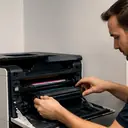
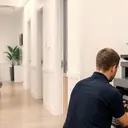
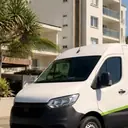
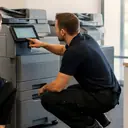
A photocopier near you is only useful if the repairer comes to it. A copier on a stand is heavy, wired to your network and often fitted with a finisher or extra trays. Moving it is awkward and, for a repair, unnecessary. Certified technicians repair and service business copiers at the customer's premises across metropolitan Sunshine Coast, for offices, practices, schools, councils, warehouses and strata.
For a smaller desktop printer the picture is different, and our companion page on printer service near you covers that side, including planned visits. This page stays with copiers.
What is inside a copier and why it matters
A copier is several machines in one frame, and a fault in one part can look like a fault in another.
- The scanner and document feeder read the original. Dirt on the glass or a worn feeder roller shows up in the copy.
- The paper path moves a sheet from tray to output through rollers, guides and sensors. This is where jams happen.
- The print engine includes the drum or imaging unit, the developer and the fuser that bonds toner to the sheet. Streaks, smears and ghosting usually start here.
- The finisher staples, punches or sorts. It has its own jams and its own codes.
- The controller connects the machine to your network and sits behind scan to email, scan to folder and printing from desks. Many machines also keep a hard drive for jobs and settings.
So a technician reads the symptom, then works out which part owns it. A faint line on every copy may be a drum or a dirty glass strip, and the way to tell is to copy from the glass and from the feeder and compare.
Common copier faults and where each one starts
This table is a starting guide, not a diagnosis. The cause can differ by make and by model.
| What you see | Where it can start | Read more |
|---|---|---|
| Paper stuck, or a jam message that returns | Pickup rollers, paper that has taken up damp, a worn guide, a sensor | Photocopier paper jams |
| A code on the panel | Any part of the machine, which is why the code matters | Copier error codes |
| Black lines or streaks on copies | Dirty scanner glass or feeder strip, the drum or imaging unit, the developer | Black lines and streaks |
| Toner that rubs off or smears | The fuser, or paper that does not suit the setting | Toner smearing and fuser faults |
| Grinding, squealing or knocking | Rollers, gears, bearings or a finisher mechanism | Copier noise |
| Prints from PCs do not arrive | The network path, the print queue or the controller, and not necessarily the engine | Copier not printing |
| Scans do not arrive | Mail server or folder settings, a changed password, a blocked connection | Scan to email not working |
Colour copies are a topic of their own. If the colours look wrong or the page shows bands, the post on colour copies that look wrong explains what registration and banding mean. For creases and wrinkles, see wrinkled or creased pages from a copier.
Error codes: write them down, do not guess
Every maker has its own code scheme, and the same number can mean different things on different machines. That is why the exact code and the make matter more than a general description. Write down the code word for word, photograph the screen, and note what you were doing when it appeared.
We have error code pages for two makes, Toshiba e-STUDIO error codes and Kyocera TASKalfa error codes, and a Xerox guide in the post on Xerox error codes and status messages. For HP office printers there is HP LaserJet error messages. Read them to understand what the machine is saying, then ring. Switching a machine off and on to clear a code can be sensible, but if the same code returns, it is telling you something and repeated restarts will not fix it.
If you see smoke or flame or smell burning, leave the machine, follow your building fire procedure and call 000. For an ordinary jam, remove the paper in the direction shown on the label inside the cover and never reach into or past a part marked hot. If the jam is at or near the fuser, shut the machine down properly and let it cool for the time the manual states.
A visit to a big office copier, in order
Every visit differs, but a repair to a floor standing copier typically follows this shape.
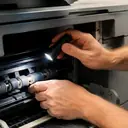
- The machine is read. The technician looks at the panel message, the machine's own fault history and its page counters before opening anything.
- The symptom is reproduced. A copy from the glass, a copy from the feeder and a print from a PC are different tests. Which one fails narrows the field.
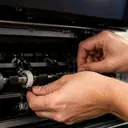
- Covers are opened and the paper path is checked. Rollers, guides, the fuser area and the finisher are looked at in turn.
- The worn or faulty part is dealt with. 98% of repairs are done on the first visit.
- The result is tested the way you use the machine. That means a copy, a print from your own PC and, if the complaint was about scanning, a scan sent to your real address or folder. A test copy proves the print engine. It does not prove your network.
- The handover is a conversation. A good technician tells the person who uses the machine what was found and what to watch for.
Copier repair near me when you run more than one make
Offices often end up with a mix: a Toshiba on the main floor, a Canon at reception and an HP laser printer beside the accounts desk, acquired at different times for different reasons. A mixed fleet is a nuisance when each make has a different repairer and a different phone number.
We service copiers by Toshiba, Kyocera, Fujifilm, Xerox, Fuji Xerox, Canon, Ricoh, Konica Minolta and Sharp. For the printers beside them there are pages for HP, Lexmark, Brother, Epson, OKI and Samsung, Zebra label printers and plotters. When you ring, say how many machines are in the office and which one has the fault. If more than one needs attention, the order is worth settling on the call. The general page on commercial printer repairs sets out the wider service.
Planned copier service
Fault repair is the main job, but copiers also suit planned service, because wear parts have published ratings and a busy machine reaches them predictably. A planned visit typically covers cleaning the paper path, checking wear parts against their page ratings, looking at the feeder and finisher, test prints and a note of what was done and what is coming due. The scope and price are agreed on the phone.
It helps to know which of your copiers is the busiest and which function staff use most: copy, print, scan or fax. Ring with those answers. For the staff side of upkeep, the post on secure print and PIN release explains a feature that confuses many users, and document feeder jams and skewed scans shows the small signs of feeder wear.
Scan to email and scan to folder
When scanning stops, the copier may be innocent. Scan to email depends on a mail server, a port, a security setting and a sign in, and scan to folder depends on a network share, a user account and permissions. Any of these can change when a password expires or a server is replaced, and the copier carries on using the old details. That is why a technician tests a scan to your real destination at handover. The post on scan to folder failing lists the network reasons, and the page on scan to email not working covers the email side. If your IT support is outside the office, have their contact ready, since some of the fixes sit on their side.
Where we service copiers across the Sunshine Coast
Here is where we attend, grouped by the kind of ground it is, with a note on what copiers there tend to face.
The coastal strip. Caloundra, Pelican Waters and Bribie Island, Little Mountain, Baringa and Currimundi, Kawana and Birtinya, Mooloolaba and Alexandra Headland, Maroochydore, Coolum and Peregian Beach, Noosa and Tewantin. Salt and humidity in the air are part of the job, and health, hospitality, real estate and professional offices are all here.
Industrial and airport areas. Warana and Kunda Park, Sippy Downs and the Maroochydore industrial area, Coolum industrial and Marcoola and Sunshine Coast Airport. Trade offices, warehouses and site offices use copiers for paperwork and plans, and Sippy Downs is also home to the University of the Sunshine Coast.
The range and inland towns. Buderim, Bli Bli and Pacific Paradise, Nambour, Palmwoods, Montville and Mapleton, Maleny, Landsborough and Mooloolah Valley, Beerwah and the Glass House Mountains, Yandina and Eumundi and Cooroy, Pomona and Cooran. The air is cooler in the hinterland and can be damp, and offices here include small business, community groups and agriculture.
The rural edges. Kenilworth, Imbil and the Mary Valley, Kilcoy and D'Aguilar, Cooloola, Tin Can Bay and Rainbow Beach and Gympie. Ring and give the address, and the call will establish whether we attend.
The whole list is on the areas we service page.
A rule for deciding what to do next
If the copier is old and the fault is serious, ask whether it is worth repairing before you commit. The page is my copier worth repairing lists what to weigh. If it is a returning fault, ring and say so, since a fault that returns is fixed again at no charge. And if the line is busy, the call is logged and returned. For anything else, contact us with the make, the model and the exact message on the screen.